Fixing issues
Review and revert changes
Every change SiteRemora makes is recorded with its before and after, and each one can be undone.
The Fixes page
Fixes lists the changes SiteRemora has made to your store, newest first. Each card shows:
- what was fixed, with the file and lines, or the image or page it was written to,
- the code before and after, or the old and new description,
- when it was applied, with a Revert button.
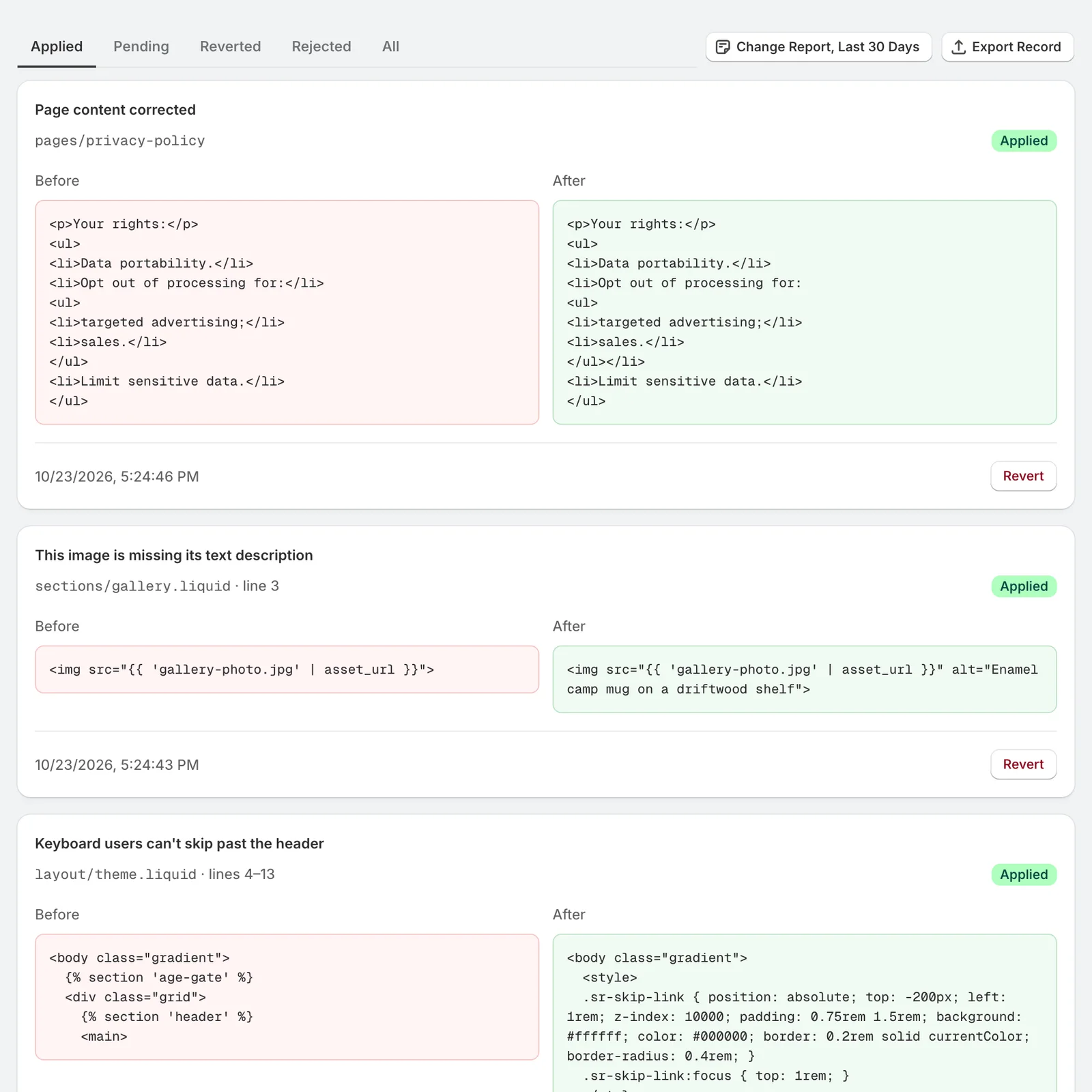
Applied shows what's live. Reverted shows what you've undone. All shows both.
Revert a fix
Click Revert on the card.
- Theme code gets back the code the fix replaced, in the same theme.
- Alt text goes back to the description the image had before.
- Page text goes back to the page as it was before the fix, which undoes later edits too.
When a fix can't be reverted
Sometimes the code a fix wrote has changed since, because someone edited the file. SiteRemora leaves the file alone, and the card says it can't revert. The before and after on the card show what to restore by hand in the code editor.
Issues you marked as fixed
Issues you marked as fixed are listed on the Fixes page under Marked as fixed. Restore puts one back on your list from the next scan. See Mark issues fixed.
Download the record
On Reef and Deep Sea, Change Report, Last 30 Days and Export Record download what changed and when. See Change report and record export.