Focus Visible
Keyboard focus always shows a visible ring or highlight.
Who it affects
A keyboard user needs to see where they are. If the focused control looks like every other one, they are lost on the page.
What a scan checks
- Every page is walked with the Tab key, and each control is compared with and without focus.
How it gets fixed
- Controls that show no change get an outline in their own text color on keyboard focus, from SiteRemora's stylesheet in your theme.
Every change is shown before it is applied, recorded with the code it replaced, and reverts in one click.
Before and after, on real stores
Found by our scanner on live Shopify stores and fixed in a test browser with the same change the app makes. The stores are described rather than named, and their names are taken out of the code.
A quantity field with no focus ring
A tea brand on Prestige
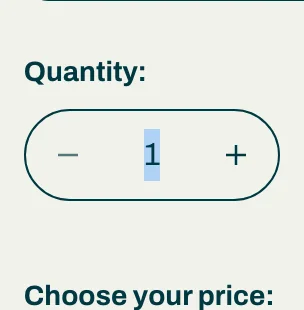
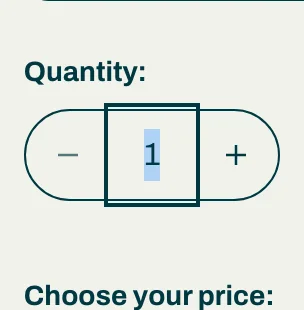
With keyboard focus on this field, nothing on screen changed except the selected number. The fix draws an outline in the field's own text color, and only for keyboard focus, so mouse and touch users see no change.
Attach a remora to your shop
Install from the App Store. The first scan is free, takes about a minute, and tells you exactly where you stand.